
SF Oracle RAC with Oracle RAC database on guest domains of single host
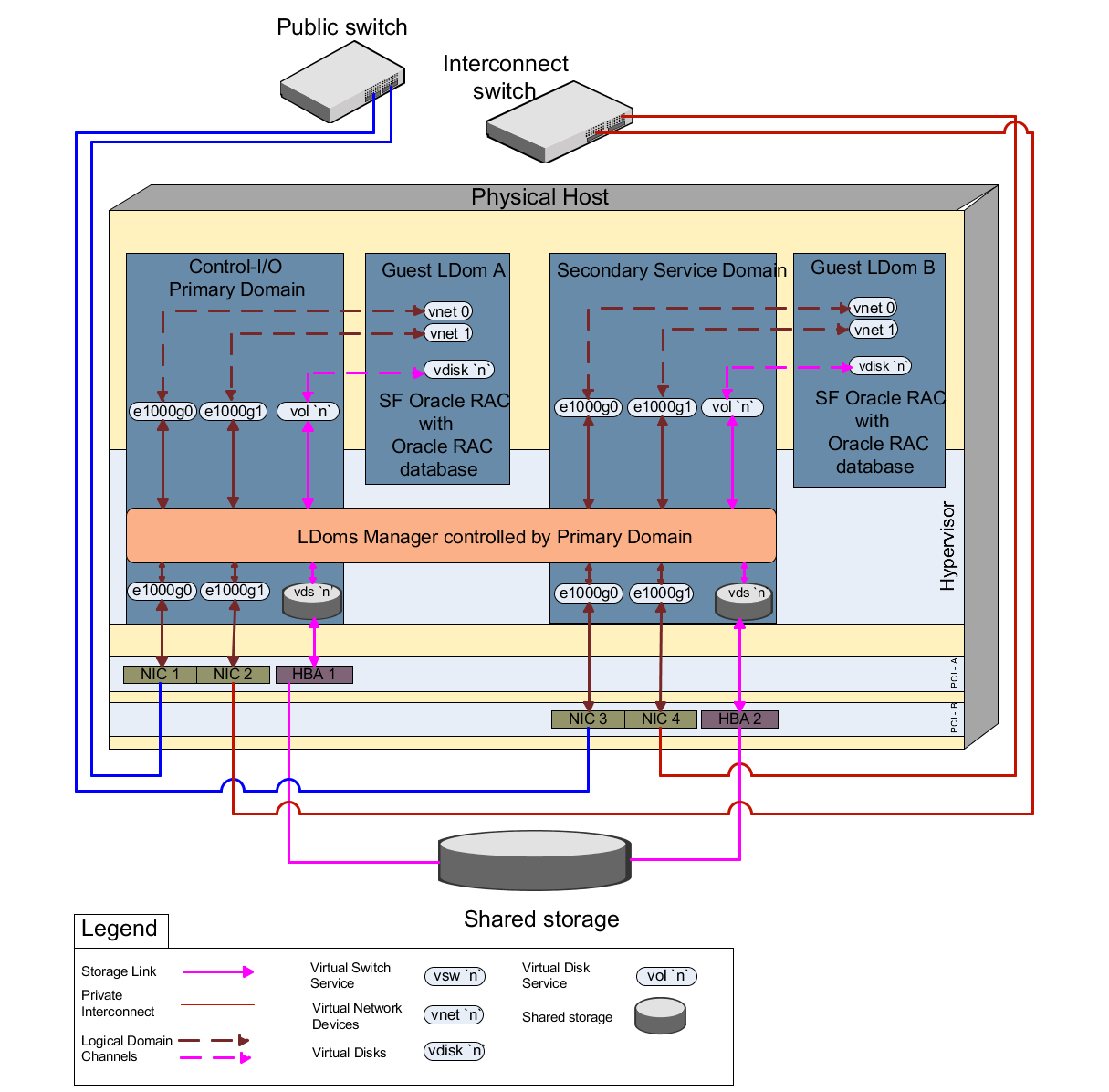
This section describes the tasks required to set up guest domains on a single host for deploying SF Oracle RAC.
Note: This setup is recommended for use as a four-node cluster by using an additional physical host with the same configuration.
The benefits of this approach are as follows:
-
Reduction in the number of physical servers used makes it a very cost-effective setup.
-
The setup is easy to create and maintain. It is also flexible and portable.
-
Many guest logical domains from multiple systems can be joined together to form a bigger cluster.
-
If the primary domain reboots, only the guest logical domain attached to it is affected. The guest logical domain attached to the secondary service domain continues to be available. Please note that shutting down the primary domain halts all domains.
The disadvantages of this approach are as follows:
-
Hardware failures act as a single point of failure, bringing down all associated domains.
-
Almost all physical resources are consumed in the creation of this setup on a T2000 Server.
Figure: SF Oracle RAC with Oracle RAC database on guest domains of single host illustrates the scenario.
Figure: SF Oracle RAC with Oracle RAC database on guest domains of single host
 |
|---|
To set up guest domains on a single host for deploying SF Oracle RAC
-
Complete the preparatory steps for setting up a logical domain environment.
-
Create a split PCI configuration on a T5k, T4, or T2000 Server.
Each bus has 2NICs and 1HBA.
-
Create one primary domain and one secondary domain.
The primary domain must be configured to be used as a control and I/O Domain (primary service domain). The secondary domain must be initially configured as an I/O domain. Next, configure the secondary I/O domain to be used as a secondary service domain. The primary domain is used to create and assign the services for this secondary service domain.
Both the primary and secondary Service domains see the storage through its respective paths.
-
Create the disk and network services on the primary service domain and assign it to guest logical domain A.
-
Create and assign a different set of disk and network services for the secondary service domain using the primary service domain. This ensures that services for guest logical domain B are provided by the secondary service domain.
-
Install Solaris operating system on the secondary service domain and the guest logical domains using native operating system installation method.
-
Install and configure SF Oracle RAC.Note: Set the public link to be used as a low priority heartbeat link due to unavailability of NICs.
-
Set up Oracle RAC database.
Related information