
Configuring VCS on logical domains to manage applications using services from multiple I/O domains
This section describes how to configure Cluster Server (VCS) on logical domains to manage applications using services from multiple I/O domains.
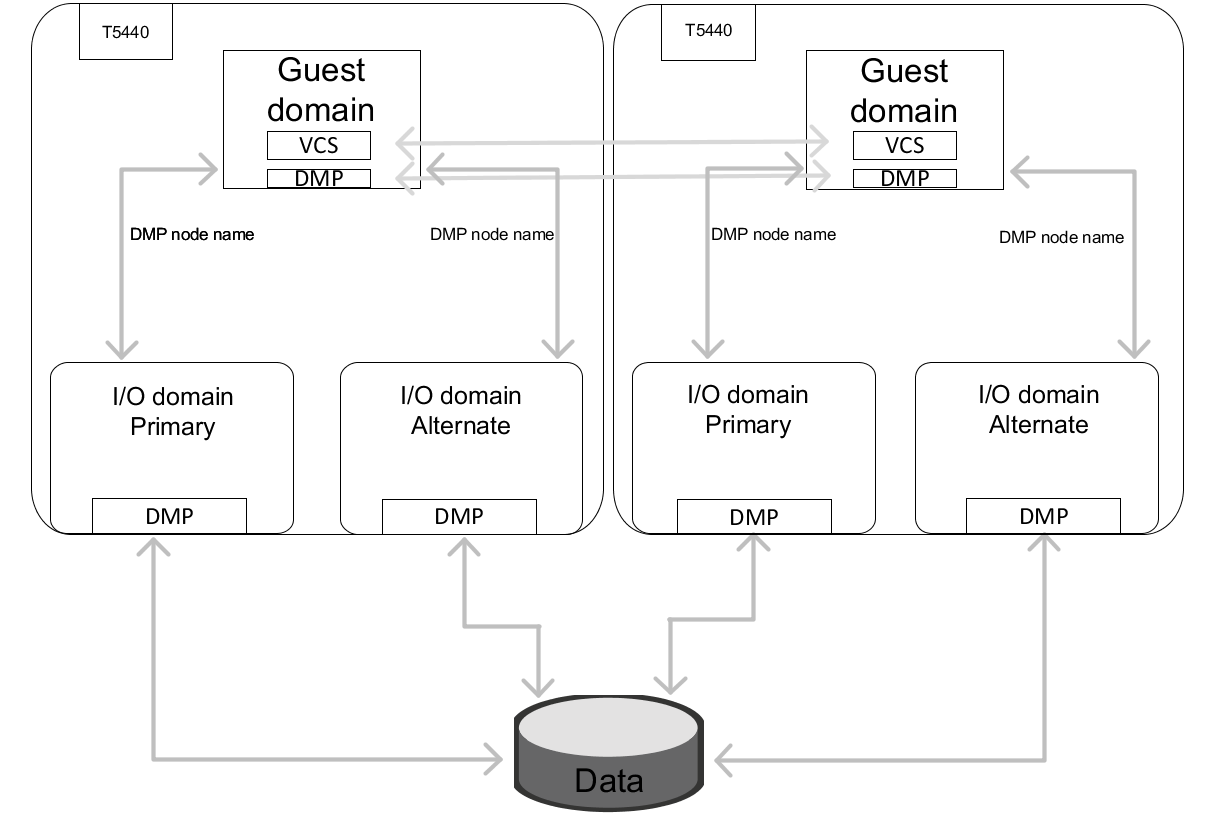
Figure: Typical two node VCS cluster setup is configured on logical domains where each guest domain receives I/O services from multiple I/O domains
 |
|---|
The typical two node VCS cluster at guest domain fails over the applications between guest domains to keep the applications highly available.
Configuring VCS on guest domains that uses services from multiple I/O domains
-
Set up the required hardware, system, storage, and network.
-
Install the operating system and the Oracle VM Server for SPARC on the physical system.
Refer to the Oracle documentation for details.
-
Set up the alternate I/O domain.
Refer to the Oracle VM Server for SPARC Administration Guide for details.
-
Set up the guest domain and provide the I/O services from all the I/O domains to the guest domain.
Refer to the Oracle VM Server for SPARC Administration Guide for details.
During the setup of the guest domain, you can choose one of the following:
-
Local disk or SAN disk as boot disk to guest domain
-
SAN disk as data disk for application
Use SAN disk for boot disk and data disk if you plan to migrate the guest domain.
-
If the storage device contains multiple paths from each I/O domain, you have the following options:
-
Install Dynamic Multi-Pathing (DMP) on the guest domain
-
Export all the paths to storage device from each I/O domain. DMP at the guest domain takes care of path management between I/O domains.
-
Install Dynamic Multi-Pathing (DMP) on I/O domains and the guest domain
Export DMP node name from each I/O domain to the guest domain. DMP at the guest domain takes care of path management between I/O domains.
-
Install VCS on the guest domain.
See the Cluster Server Configuration and Upgrade Guide for details.
-
Configure the application service group.
See the Cluster Server Administrator's Guide and Cluster Server Bundled Agents Reference Guide for details.
Related information