
Configure network service groups
VCS agents manage network resources that are made available to a guest Logical Domain. Depending on the back-end storage device, use appropriate VCS agent. For more information, see Identify supported storage and network services.
Note: You must configure a network service group on each physical system in the cluster.
Figure: shows network service groups in the control domain and alternate I/O domain
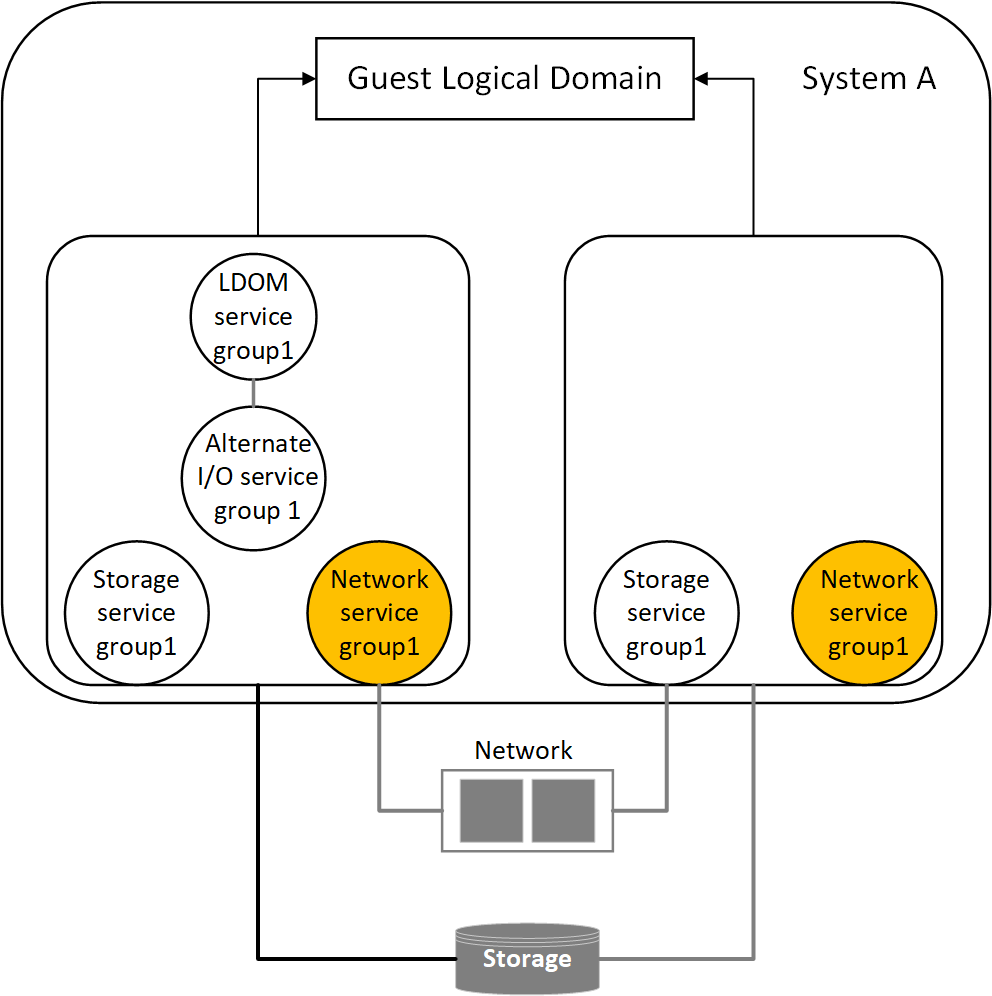 |
|---|
Perform the configuration steps for the network service group on each physical system.
| Configuration parameter | Description |
|---|---|
| Localize network resource attribute | You may need to localize VCS resources depending on the back-end network device. |
| For example, for disk agent, if the network device exported from control and alternate I/O domain are different, you need to localize the Device attribute. | |
| lang=txt | |
| NIC primary1-network | |
| ( | |
| Device @primary = nxge3 | |
| Device @alternate = nxge4 | |
| ) | |
| Service group type | Service groups that manage network services in the control domain and alternate I/O domain must be configured as a parallel service group. |
| Configure the SystemList attribute | Modify the SystemList attribute in the service group to add host names of the control domain and alternate I/O domain configured on the physical system. |
| Configure Phantom resource | If all the resources are of the type NIC, configure a Phantom resource. |
| The NIC resource is of the type OnOnly and does not contribute to determine the state of the service group. The Phantom resource enables VCS to determine the state of parallel service groups that do not include OnOff resources. | |
| For more information on the Phantom agent, refer to the Cluster Server Bundled Agents Reference Guide. |
An example of network service group configuration from
main.cf (for a setup that has two physical systems)
Control domain host names - primary1, primary2
Alternate domain host names - alternate1, alternate2
group primary1-nwsg (
         SystemList = { primary1 = 0, alternate1 = 1 }
         AutoStartList = { primary1, alternate1 }
         Parallel = 1
         )

         NIC nicres1 (
                 Device @primary1 = nxge3
                 Device @alternate1 = nxge1
                 )

         Phantom ph3 (
                 )
 group primary2-nwsg (
         SystemList = { primary2= 0, alternate2 = 1 }
         AutoStartList = { primary2, alternate2 }
         Parallel = 1
         )

         NIC  nicres2(
                 Device @primary2= nxge3
                 Device @alternate2 = nxge1
                 )

         Phantom ph4 (
                 )