
Configure storage service groups
VCS agents manage storage services that are made available to a guest Logical Domain. Depending on the back-end storage device, use the appropriate VCS agent. For more information on supported VCS agents, see Identify supported storage and network services.
Note: You must configure a storage service group on each physical system in the cluster.
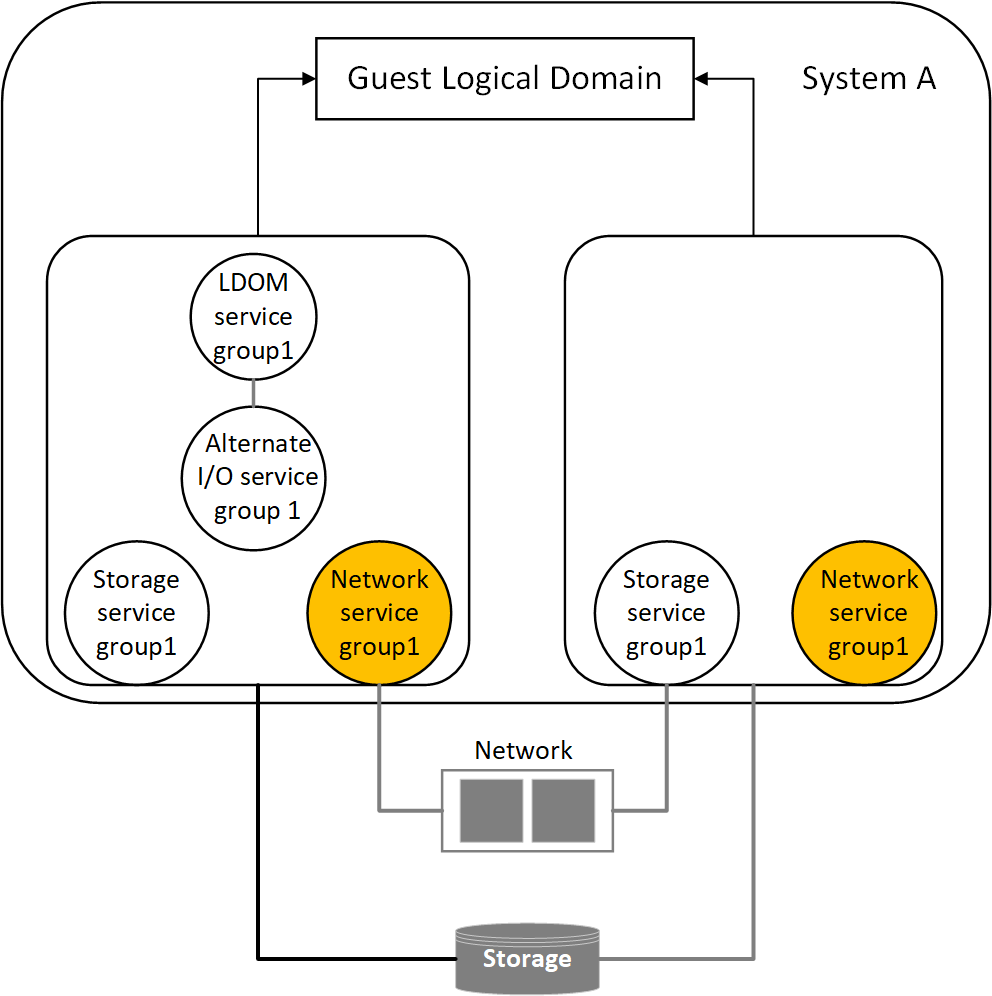
Figure: shows storage service groups in the control domain and alternate I/O domain on a physical system
 |
|---|
| Configuration parameter | Description |
|---|---|
| Localize resource attribute value | You may need to localize VCS resource attributes depending on the type of back-end storage device. |
| For example, for Disk resource, if the back-end storage paths from the control and alternate I/O domains are different, you need to localize the partition attribute. | |
| lang=txt | |
| Disk disk1 | |
| ( | |
| Partition @primary = \ | |
| "/dev/rdsk/c3t50060E8000C46C50d2s2" | |
| Partition @alternate = \ | |
| "/dev/rdsk/c1t50060E8000C46C50d2s2" | |
| ) | |
| Service group type | Service groups that manage storage services in the control domain and alternate I/O domain must be configured as a parallel service group. |
| Configure the SystemList attribute | Modify the SystemList attribute of the service group to add hostnames of the control domain and alternate I/O domain configured on the physical system. |
| Configure Phantom resource | If all the resources are of the type Disk, configure a Phantom resource. |
| The Disk resource is of the type OnOnly and does not contribute to determine the state of the service group. The Phantom resource enables VCS to determine the state of parallel service groups that do not include OnOff resources. | |
| For more information on the Phantom agent, refer to the Cluster Server Bundled Agents Reference Guide. |
An example of storage service group configuration from
main.cf configuration (for a setup that has two physical systems)
Control domain host names - primary1, primary2
Alternate domain host names - alternate1, alternate2
group primary1-strsg (
         SystemList = { primary1 = 0, alternate1 = 1 }
         AutoStartList = { primary1, alternate1 }
         Parallel = 1
         )

         Disk disk1
                              (
         Partition @primary1 = "/dev/rdsk/c3t50060E8000C46C50d2s2"
         Partition @alternate1 = "/dev/rdsk/c1t50060E8000C46C50d2s2"
         )

         Phantom ph1 (
                 )
 group primary2-strsg (
         SystemList = { primary2 = 0, alternate2 = 1 }
         AutoStartList = { primary2, alternate2 }
         Parallel = 1
         )

         Disk disk2
                                 (
         Partition @primary2 = "/dev/rdsk/c3t50060E8000C46C50d2s2"
         Partition @alternate2 = "/dev/rdsk/c1t50060E8000C46C50d2s2"
         )

         Phantom ph2 (
                 )