
Configuring virtual disk with LUN, Shared Disk, or CVM Volume
Use the following procedure to configure virtual disk with LUN, Shared Disk, or CVM Volume:
To configure virtual disk
-
Add the physical disk back-end path of the disk service to the primary domain.
\# ldm add-vdsdev backend_path1 volume@primary-vds0wherebackend_path1is the path to the virtual disk back-end from the primary domain.-
Add the physical disk back-end path of the disk service to the alternate I/O domain for disk added in step 1.
\# ldm add-vdsdev backend_path2 volume@alternate-vds0 -
where
backend_path2 is the path to the virtual disk back-end from the alternate I/O domain.
-
Export the virtual disk to the guest domain.
\# ldm add-vdisk disk_name volume@primary-vds0 ldom_name\# ldm add-vdisk disk_name volume@alternate-vds0 ldom_name
where
disk_name is the name of the virtual storage device.
where
ldom_name is the name of the Logical Domain.
Note: Do not set the value of theOptionsattribute to exclusive;excl. If set to exclusive, Logical Domain cannot use the multipathing functionality.
For more details on configuring virtual disk multipathing, refer to the Oracle VM server for SPARC Administration Guide.
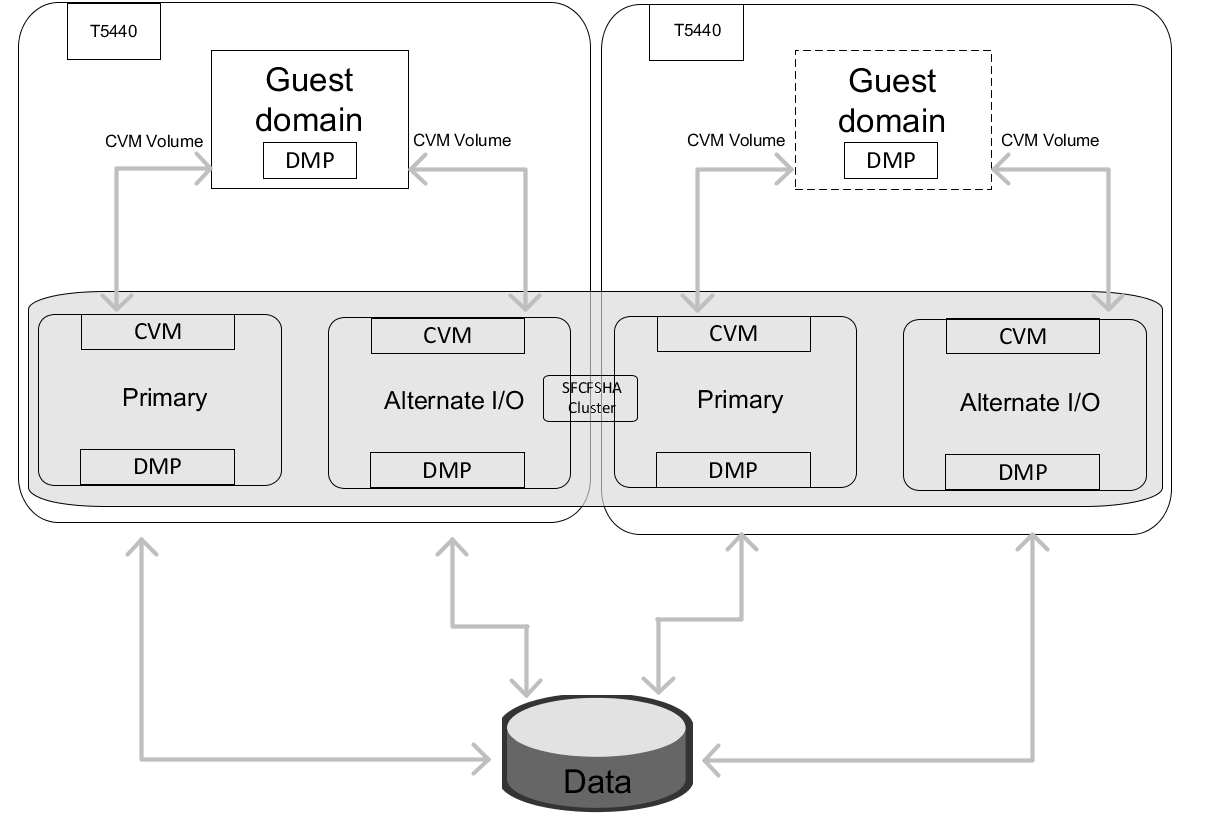
Figure: shows a sample diagram for CVM Volume
Related information