
Takeover
You can initiate takeover on a secondary cluster when peer primary cluster is down or disconnected. This can be used in case of disaster when primary cluster abruptly goes down or is disconnected, and application stack is online on the primary cluster. To recover, you can initiate a takeover. Takeover must be initiated from the surviving target cluster(the secondary cluster) where you want to recover application instances. On the secondary cluster, you can run
kubectl or oc edit/patch <NameofDRplan> and update Spec:Force and Spec:PrimaryCluster attributes. Spec:PrimaryCluster must be changed to current primary cluster details.
Spec:Force attribute is a part of the DisasterRecoveryPlan object. Whenever you initiate a takeover, Spec:Force must be set to true. After Spec:Force is set to true, do not edit DisasterRecoveryPlan object. As peer clusters are not connected, any changes in DisasterRecoveryPlan cannot be synchronized across all peer clusters. As soon as all clusters are connected, stale application instances on outdated primary cluster are removed. Spec:Force is also automatically reset to false when all clusters are connected, thus concluding takeover operations.
Figure: Before Takeover
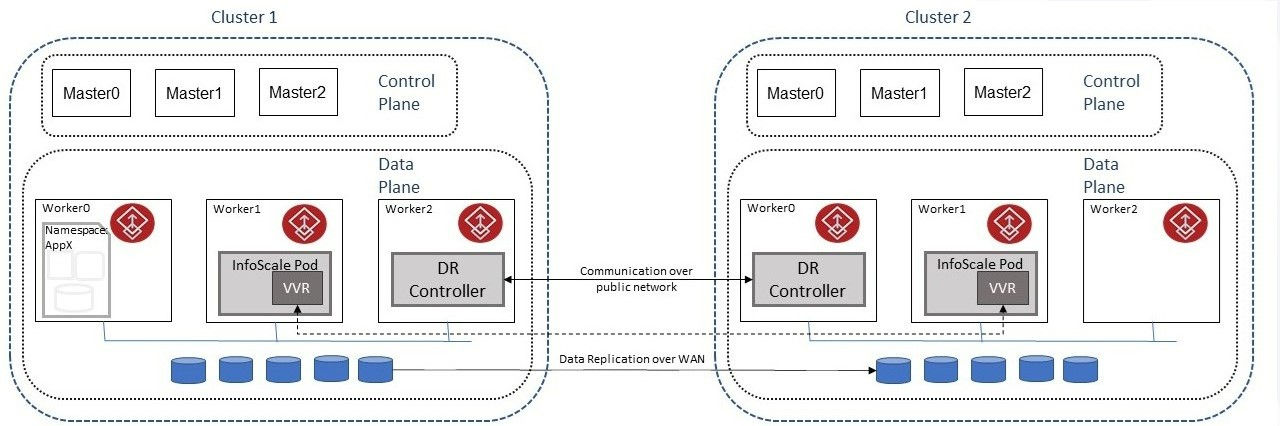
Following entities are updated during a takeover.
-
Application metadata: When a takeover is initiated on the target cluster, latest/recent snapshot of managed application's metadata from the primary cluster is tagged for restoration. This snapshot is used for restoring application stack.
-
Application data: For stateful applications, you must have configured DataReplication CR and updated
DisasterRecoveryPlan:Spec:DataReplicationPointeraccordingly. DataReplication CR manages replication of application data from the primary cluster to the peer clusters(source to target). When a takeover is initiated on the target cluster, the proposed primary cluster assumes 'Primary' role and is allowed read write on Volumes. When outdated primary cluster is connected, it joins as a 'Secondary' role. -
DNS end points: The DNS custom resource updates and monitors the mapping for
-
The host name to IPaddress (A, AAAA, or PTR record)
-
Alias to hostname or canonical name(CNAME)
-
When a takeover is initiated, the DNS resource records are updated appropriately
Figure: After Takeover

You can check intermediate transient states like
BackupStatus, ScheduleStatus, RestoreStatus, and DataReplicationStatus attributes of the Disaster Recovery Plan during takeover. To check logs if migration is stuck, run kubectl/oc logs -f --tail=100 deployments.apps/infoscale-dr-manager -n infoscale-vtas. After migration is complete, these transient states are cleaned and Status:PrimaryCluster in DisasterRecoveryPlan is updated to the new primary.
Related information