
DR from on-premises to Azure and across Azure regions or VNets - Linux
VCS lets you use the global cluster option (GCO) for DR configurations. You can use a DR configuration to fail over applications across different regions or VNets in Azure or between an on-premises site and Azure.
The following is required for on-premise to cloud DR using VPN tunneling:
-
Prepare the setup at on-premise data center
-
Prepare the setup at on-cloud data center
-
Establish a VPN tunnel from on-premise data center to cloud data center
-
Virtual private IP for cluster nodes that exist in the same subnet. The IP address is used for cross-cluster communication
The following is required for region to region DR using VNet peering:
-
Prepare the setup at both the data centers in the regions
-
Establish a VNet peering from one region to the other region
-
Virtual private IP for cluster nodes that exist in the same subnet. The IP address is used for cross-cluster communicationNote: If you use an VPN tunnel between an on-premises site and Azure or you use VNet peering between Azure regions, the cluster nodes in the cloud must be in the same subnet.
Sample configuration with private IP
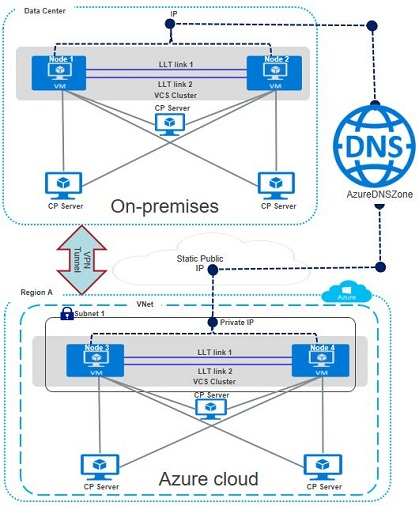
The sample configuration includes the following elements:
-
VPN tunnel between on-premise data center and Region A
-
The primary site has the following elements:
-
Cluster nodes in the same subnet
-
Fencing is configured using CP servers or disk-based I/O fencing
-
Virtual private IP for cross-cluster communication
-
-
The secondary site has the following elements:
-
A VNet is configured in Region A of the Azure cloud
-
The same application is configured for HA on Node 3 and Node 4, which exist in Subnet
-
Fencing is configured using CP servers
-
Virtual private IP for cross-cluster communication
-
Sample service group configuration with private IP
The following snippet is a service group configuration from a sample configuration file (main.cf):
cluster shil-sles11-clus1-eastus (
         ClusterAddress = "10.3.3.100"
         SecureClus = 1
         )

 remotecluster shil-sles11-clus2-eastus2 (
         ClusterAddress = "10.5.0.5"
         )

 heartbeat Icmp (
         ClusterList = { shil-sles11-clus2-eastus2 }
         Arguments @shil-sles11-clus2-eastus2 = { "10.5.0.5" }
         )

 system azureVM1 (
         )

 system azureVM2 (
         )

 group AzureAuthGrp (
         SystemList = { azureVM1 = 0, azureVM2 = 1 }
         Parallel = 1
         )

         AzureAuth azurauth (
                 SubscriptionId = 6940a326-abg6-40dd-b628-c1e9bbdf1d63
                 ClientId = 8c891a8c-xyz2-473b-bigc-035bd50fb896
                 SecretKey = gsiOssRooSpsPotQkmOmmShuNoiQioNsjQlqHovUosQsrMt
                 TenantId = 96dcasae-0448-4308-b503-6667d61dd0e3
                 )

         Phantom phres (
                 )

 group ClusterService (
         SystemList = { azureVM1 = 0, azureVM2 = 1 }
         AutoStartList = { azureVM1, azureVM2 }
         OnlineRetryLimit = 3
         OnlineRetryInterval = 120
         )

         Application wac (
                 StartProgram = "/opt/VRTSvcs/bin/wacstart -secure"
                 StopProgram = "/opt/VRTSvcs/bin/wacstop"
                 MonitorProcesses = { "/opt/VRTSvcs/bin/wac -secure" }
                 RestartLimit = 3
                 )

         AzureIP azureipres (
                 PrivateIP = "10.3.3.100"
                 NICDevice = eth0
                 VMResourceGroup = ShilRG
                 AzureAuthResName = azurauth
                 )

         IP gcoip (
                 Device = eth0
                 Address = "10.3.3.100"
                 NetMask = "255.255.255.0"
                 )

         NIC gconic (
                 Device = eth0
                 )

         gcoip requires azureipres
         gcoip requires gconic
         wac requires gcoip

  group VVR (
         SystemList = { azureVM1 = 0, azureVM2 = 1 }
         AutoStartList = { azureVM1, azureVM2 }
         )

         AzureDisk diskres (
                 DiskIds = {
                          "/subscriptions/6940a326-abg6-40dd-b628-c1e9bbdf1d63/
                                                                                                         resourceGroups/SHILRG/providers/Microsoft.Compute/
                                                                                                         disks/azureDisk1_shilvm2-sles11" }
                 VMResourceGroup = ShilRG
                 AzureAuthResName = azurauth
                 )

         AzureDisk diskres1 (
                 DiskIds = {
                          "/subscriptions/6940a326-abg6-40dd-b628-c1e9bbdf1d63/
                                                                                                         resourceGroups/SHILRG/providers/Microsoft.Compute/
                                                                                                         disks/azureDisk1_shilvm2-sles11_1" }
                 VMResourceGroup = ShilRG
                 AzureAuthResName = azurauth
                 )

         AzureDisk diskres3 (
                 DiskIds = {
                          "/subscriptions/6940a326-abg6-40dd-b628-c1e9bbdf1d63/
                                                                                                         resourceGroups/SHILRG/providers/Microsoft.Compute/
                                                                                                         disks/azureDisk1_shilvm2-sles11_2" }
                 VMResourceGroup = ShilRG
                 AzureAuthResName = azurauth
                 )

         AzureIP azureipres_vvr (
                 PrivateIP = "10.3.3.200"
                 NICDevice = eth0
                 VMResourceGroup = ShilRG
                 AzureAuthResName = azurauth
                 )

         AzureIP azureipres_vvr1 (
                 PrivateIP = "10.3.3.201"
                 NICDevice = eth0
                 VMResourceGroup = ShilRG
                 AzureAuthResName = azurauth
                 )

         DiskGroup dgres (
                 DiskGroup = vvrdg
                 )

         IP ip_vvr (
                 Device = eth0
                 Address = "10.3.3.200"
                 NetMask = "255.255.255.0"
                 )

         NIC nic_vvr (
                 Device = eth0
                 )

         RVG rvgres (
                 RVG = rvg
                 DiskGroup = vvrdg
                 )

         azureipres_vvr requires ip_vvr
         dgres requires diskres
         dgres requires diskres1
         ip_vvr requires nic_vvr
         rvgres requires azureipres_vvr
         rvgres requires dgres

 group datagrp (
         SystemList = { azureVM1 = 0, azureVM2 = 1 }
         ClusterList = { shil-sles11-clus1-eastus = 0,
                  shil-sles11-clus2-eastus2 = 1 }
         Authority = 1
         )
 Application sample_app (
 User = "root"
 StartProgram = "/data/sample_app start"
 StopProgram = "/data/sample_app stop"
 PidFiles = { "/var/lock/sample_app/app.pid" }
 MonitorProcesses = { "sample_app" }
 )
         Mount mountres (
                 MountPoint = "/data"
                 BlockDevice = "/dev/vx/dsk/vvrdg/vol1"
                 FSType = vxfs
                 FsckOpt = "-y"
                 )

         RVGPrimary rvgprimary (
                 RvgResourceName = rvgres
                 AutoResync = 1
                 )

         requires group VVR online local hard
         mountres requires rvgprimary
        sample_app requires  mountres
Related information