
Replication across AWS regions - Linux
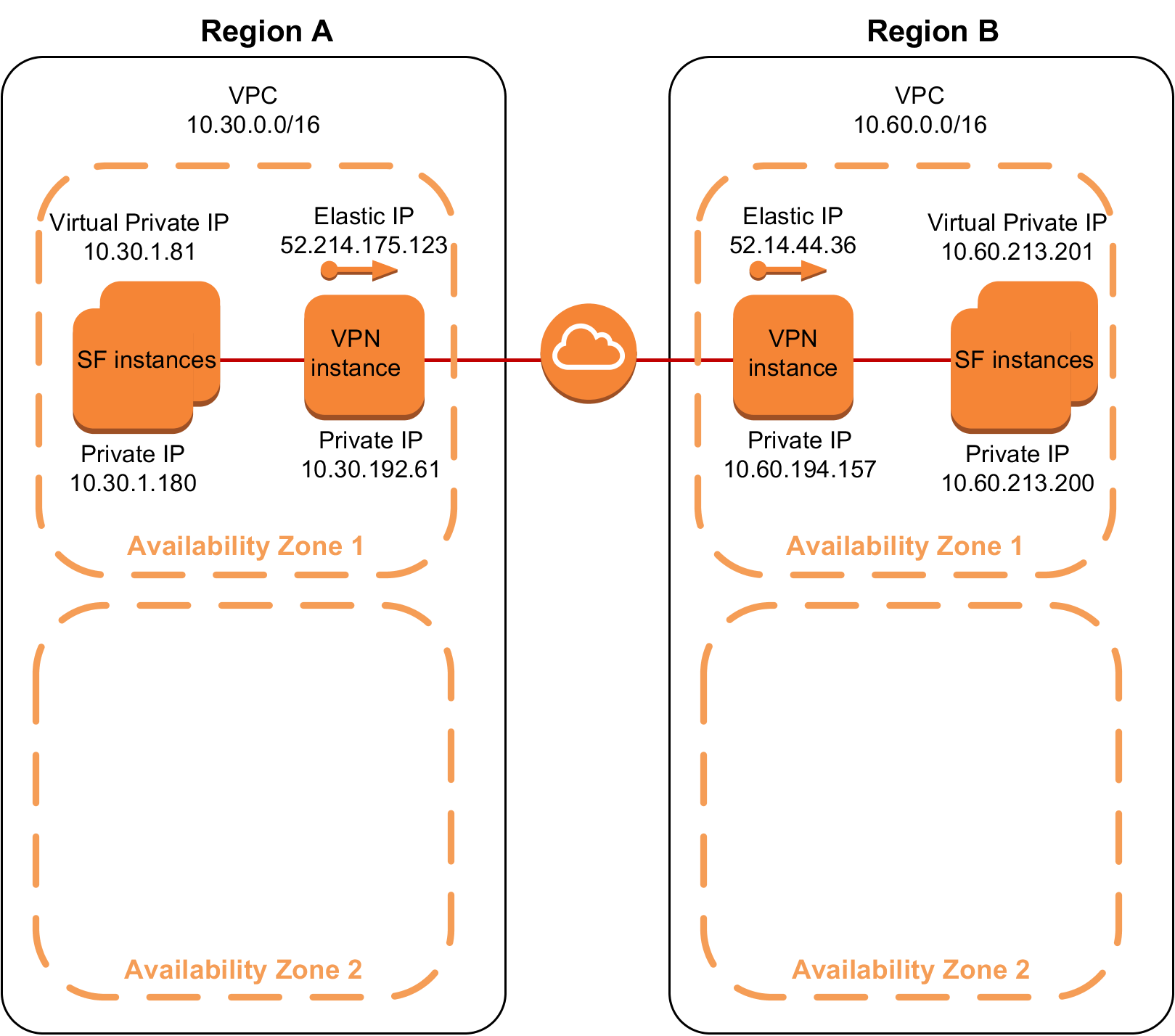
In this scenario, replication is set up across Availability Zones configured in different regions. The configuration uses software VPN
Openswan to connect the VPCs across different regions.
-
Two VPCs with valid CIDR blocks (for example, 10.30.0.0/16 and 10.60.0.0/16 respectively) that are located in two different regions.
-
The primary instance belongs to AZ1 of region A and the secondary instance belongs to AZ1 of region B.
-
InfoScale instances in each AZ.
-
A VPN tunnel is established between two VPCs in two different regions using software VPN. Here, we have used OpenSwan software VPN. This is a secure IPSec tunnel.
-
Elastic IP addresses (EIP) to connect the two VPN instances
-
Private IP addresses used for replication in standalone environments OR
Virtual private IP addresses used for replication in clustered environments.
Figure: Replication across AWS regions
Setting up replication across regions
Perform the steps in the following procedure to set up replication across regions.
To set up replication across regions
-
Create two VPCs with valid CIDR blocks in different regions, for example, 10.30.0.0/16 and 10.60.0.0/16 respectively.
-
Create the primary site EC2 instance.
-
Create the primary site VPN instance, which belongs to the same VPC as that of the primary EC2 instance.
-
Modify the route table on the primary site. Ensure that the route table entry directs the secondary site traffic through the primary site VPN instance.
-
Create the secondary site EC2 instance.
-
Create the secondary site VPN instance, which belongs to the same VPC as that of the secondary EC2 instance.
-
Modify the route table on the secondary site. Ensure that the route table entry directs the primary site traffic through the secondary site VPN instance.
-
Set up connectivity across regions using software VPN. The sample configuration uses Openswan.
Perform the following steps:
-
Install the Openswan packages on the primary and secondary VPN instances.
-
Configure the
/etc/ipsec.confand/etc/ipsec.secretsfiles.Note: The/etc/ipsec.conffile contains information about the private IP address of the VPN instance, the subnet range of the left subnet, elastic IP address of the destination VPN, the subnet range of the destination right subnet. The/etc/ipsec.secretsfile contains the secret key. This key must be the same on both VPN sites. -
Restart the IPSec service.
\# service ipsec restart
 -  Add the IPSec connection.
 \# ipsec auto --add vpc2vpcConnection
\# ipsec auto --up vpc2vpcConnection -
Enable IPSec forwarding. \# sysctl -w net.ipv4.ip_forward=1
 1.  Set up replication between the instances using the private IP address or virtual private IP address.

 For instructions, see the chapter *Setting up replication* in the *Veritas InfoScale Replication Administrator's Guide - Linux*.

 1.  Verify the status of replication.

 ```bash
 \# vradmin -g dg_name repstatus rvg_name
Ensure that the replication status shows:
Replication status: replicating (connected)
Related information