
DR from on-premises to AWS - Windows
InfoScale Enterprise lets you use the global cluster option (GCO) for DR configurations. You can use a DR configuration to fail over applications from on-premise cluster to AWS.
The following information is required:
-
VPN tunnel information between regions or VPCs
-
The Virtual private IP address to be used for cross-cluster communication.Note: If you use an Amazon VPN tunnel in a global cluster configuration between an on-premises site and AWS, the cluster nodes in the cloud must be in the same subnet.
Sample configuration for DR across regions or VPCs
The following graphic depicts a sample DR configuration from on-premise cluster to AWS cloud:
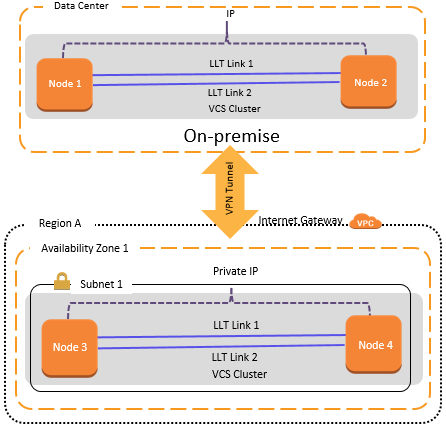
The sample configuration includes the following elements:
-
VPN tunnel between on-premise data center and Region A
-
The primary site has the following elements:
-
Cluster nodes in the same subnet
-
Virtual private IP for cross-cluster communication
-
-
The secondary site has the following elements:
-
A virtual private cloud, VPC, is configured in Region Aof the AWS cloud
-
The same application is configured for HA on Node 3 and Node 4, which exist in the same subnet
-
Sample service group configuration for GCO from on-premise to cloud
The following snippet is a service group configuration from a sample VCS configuration file (main.cf) for a single node:
include "types.cf"

 cluster vvr_aws (
           ClusterAddress = "10.239.3.96"
           SecureClus = 1
           )

 remotecluster vvr_cloud (
           ClusterAddress = "10.209.57.98"
           ConnectTimeout = 30000
           SocketTimeout = 30000
           )

 heartbeat Icmp (
           ClusterList = { vvr_cloud }
           AYARetryLimit = 10
           Arguments @vvr_cloud = { "10.209.57.98" }
           )

 system WIN-38PNEVJSR2K (
           )

 group ClusterService (
           SystemList = { WIN-38PNEVJSR2K = 0 }
           AutoStartList = { WIN-38PNEVJSR2K }
           )

           AWSIP gcoawsip (
                    PrivateIP = "10.239.3.96"
                    Device = 12-7F-CE-5B-E2-6E
                    )

           IP csg_ip (
                    Address = "10.239.3.96"
                    SubNetMask = "255.255.254.0"
                    MACAddress @WIN-38PNEVJSR2K = "12:7F:CE:5B:E2:6E"
                    )

           NIC csg_nic (
                    MACAddress @WIN-38PNEVJSR2K = "12:7F:CE:5B:E2:6E"
                    )

           Process wac (
                    StartProgram @WIN-38PNEVJSR2K = "\"C:\\Program Files\\
                                                                                             Veritas\\Cluster Server\\bin\\wac.exe\""
                    StopProgram @WIN-38PNEVJSR2K = "\"C:\\Program Files\\
                                                                                             Veritas\\Cluster Server\\bin\\wacstop.exe\""
                    MonitorProgram @WIN-38PNEVJSR2K = "\"C:\\Program Files\\
                                                                                         Veritas\\Cluster Server\\bin\\wacmonitor.exe\""
                    )

           csg_ip requires csg_nic
           wac requires gcoawsip
           wac requires csg_ip

 group fileshare (
           SystemList = { WIN-38PNEVJSR2K = 0 }
           ClusterList = { vvr_cloud = 1, vvr_aws = 0 }
           Authority = 1
           ClusterFailOverPolicy = Auto
           )

           AWSIP vvrawsip (
                    PrivateIP = "10.239.3.97"
                    Device @WIN-38PNEVJSR2K = 12-7F-CE-5B-E2-6E
                    )

           FileShare fileshare-FileShare (
                    PathName = "\\"
                    ShareName = testshare
                    LanmanResName = fileshare-Lanman
                    MountResName = mounvres
                    UserPermissions = { Everyone = FULL_CONTROL }
                    )

           IP fileshare-IP (
                    Address = "10.239.3.97"
                    SubNetMask = "255.255.254.0"
                    MACAddress @WIN-38PNEVJSR2K = 12-7F-CE-5B-E2-6E
                    )

           Lanman fileshare-Lanman (
                    VirtualName = FILESHARE-DHAWA
                    IPResName = fileshare-IP
                    )

           MountV mounvres (
                    MountPath = "e:"
                    VolumeName = datavol
                    VMDGResName = vmnsdg
                    )

           NIC fileshare_NIC (
                    MACAddress @WIN-38PNEVJSR2K = "12:7F:CE:5B:E2:6E"
                    )

           RVGPrimary rvgprimary_1 (
                    RvgResourceName = vvrsg-VvrRvg
                    AutoResync = 1
                    )

           requires group vvrsg online local hard
           vvrawsip requires fileshare_NIC
           fileshare-FileShare requires mounvres
           fileshare-FileShare requires fileshare-Lanman
           fileshare-IP requires vvrawsip
           fileshare-Lanman requires fileshare-IP
           mounvres requires rvgprimary_1

 group vvrsg (
           SystemList = { WIN-38PNEVJSR2K = 0 }
           AutoStartList = { WIN-38PNEVJSR2K }
           )

           Proxy proxy_ip (
                    TargetResName = csg_ip
                    )

           Proxy proxy_nic (
                    TargetResName = csg_nic
                    )

           VMNSDg vmnsdg (
                    DiskGroupName = vvrdg
                    DGGuid = 03d725b1-fca3-49b2-b722-38984835e6b0
                    )

           VvrRvg vvrsg-VvrRvg (
                    RVG = rvg
                    VMDgResName = vmnsdg
                    IPResName = proxy_ip
                    )

           vvrsg-VvrRvg requires proxy_nic
           vvrsg-VvrRvg requires proxy_ip
           vvrsg-VvrRvg requires vmnsdg
Related information