
Creating node affine volumes
Overview
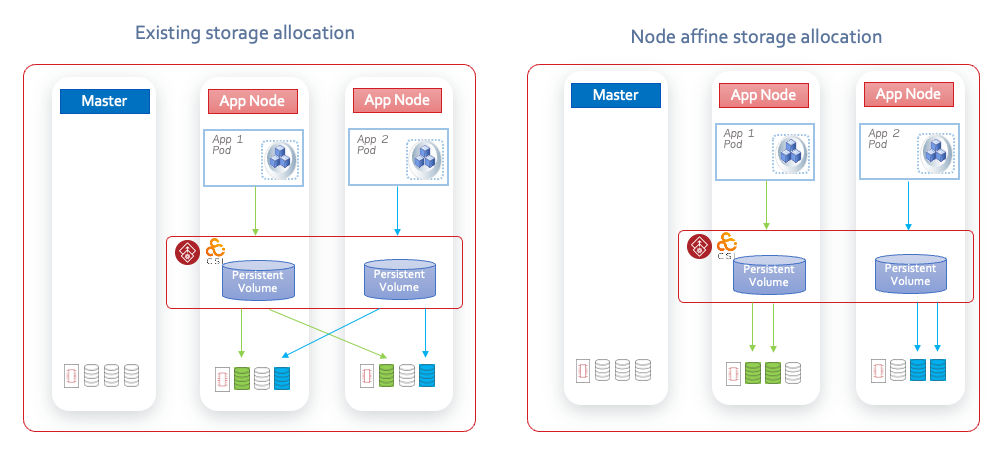
Node affine volumes are a specialized type of striped only (no mirrors) volume that allocate storage exclusively to a specific node, ensuring that all I/O operations are served from local storage. This eliminates the need for network-based storage access. This approach is particularly effective for OLAP applications that require high-performance file storage, where traditional solutions like NFS or iSCSI may not perform well in such use-cases.
VIKE, as a hyper-converged solution, leverages node affine volumes to storage allocation, thereby achieving high performance through local I/O and efficient striping across multiple disks.
Enabling node affinity
To enable node affinity, specify the nodeAffinity parameter in the storage class. This parameter can be set to either:
-
true \- Enables node affinity, with node selection based on the volume binding mode.
-
Node name \- Specifies the Kubernetes node to which the volume should be affined.
Volume binding modes
The node selection for storage allocation through node affinity depends on the volume binding mode configured in the storage class:
-
Immediate binding
-
Storage is allocated as soon as the PersistentVolumeClaim (PVC) is created, potentially before the application pod is created.
-
The InfoScale CSI driver selects the node for storage allocation based on the policy specified in the storage class.
-
Once the volume is created, the appropriate nodeAffinity is set in the PersistentVolume (PV) object, ensuring that Kubernetes schedules the application pod on the same node.
-
-
Delayed binding (wait for first consumer)
-
Storage allocation is delayed until the application pod is scheduled.
-
Kubernetes first selects the node for the application pod and then passes the node information to the InfoScale CSI driver for storage allocation on that node.
-
If the selected node does not have enough storage, the driver notifies the Kubernetes scheduler to reschedule the pod on a different node.
-
Supported allocation policies
Specify the policy using the nodeAffinityType parameter. The available options are:
-
bestspread (default) - Selects the node with the maximum available storage among the nodes that can fulfill the request. This policy evenly spreads application pods but may result in suboptimal storage utilization.
-
bestfit \- Selects the node with the least available storage that can still satisfy the request. This policy optimizes storage utilization but may lead to uneven pod distribution.
Configuration parameters
The following parameters are used to configure node affinity:
Related information
Table: Configuration parameters for node affinity
| Parameter | Description | Default value |
|---|---|---|
| nodeAffinity | Set to 'true' or the name of the Kubernetes node to which the volume should be affined. | N/A |
| nodeAffinityType | Set to 'bestspread' or 'bestfit'. | 'bestspread' |