
Public access to cluster nodes in Azure using public IP - Linux
To allow public access to a cluster node or to an application configured for HA in Azure environment, specify the IP in the PublicIP attribute for the AzureIP resource. This IP is used to map the Public IP address to a secondary private IP address. For example, if you have an application that needs to be highly available and to be accessible globally, you can use the PublicIP attribute of the AzureIP agent to ensure both.
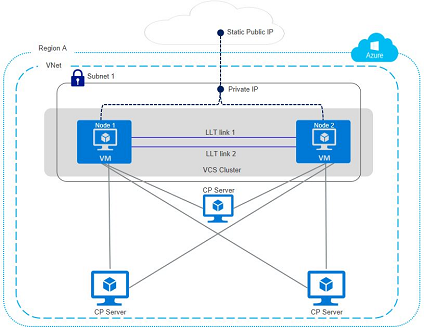
Sample service group configuration with Public IP
The following snippet is a service group configuration from a sample configuration file (main.cf):
Sample configuration using AzureAuth agent
group AzureAuthGrp (
                         SystemList = { azureVM1 = 0, azureVM2 = 1 }
                         Parallel = 1
                         )

 AzureAuth azurauth (
                     SubscriptionId = 6940a326-abg6-40dd-b628-c1e9bbdf1d63
                     ClientId = 8c891a8c-xyz2-473b-bigc-035bd50fb896
                     SecretKey = gsiOssRooSpsPotQkmOmiQioNsjQlqHovUosQsrMt
                     TenantId = 96dcasae-0448-4308-b503-6667d61dd0e3
                     )
                 Phantom phres (
                 )

 group AzurePrivateIP (
                 SystemList = { azureVM1 = 0, azureVM2 = 1 }
                 AutoStartList = { azureVM1, azureVM2 }
                 )
                 AzureIP azureipres (
                 PrivateIP = "10.3.3.100"
                 NICDevice = eth0
              PublicIP = "40.71.178.90"
                 AzureAuthResName = azurauth
                 )
 IP ipres (
             Device = eth0
             Address = "10.3.3.100"
             NetMask = "255.255.255.0"
             )
 NIC nicres (
             Device = eth0
             )
             ipres requires azureipres
             ipres requires nicres
Sample configuration using a managed identity
group AzurePrivateIP (
 SystemList = { azureVM1 = 0, azureVM2 = 1 }
 AutoStartList = { azureVM1, azureVM2 }
 )

 AzureIP azureipres (
 PrivateIP = "10.3.3.100"
 NICDevice = eth0
 PublicIP = "40.71.178.90"
 ManagedIdentityClientID = 1da89bd2-9735-4266-b920-27c23b98f022
 )

 IP ipres (
 Device = eth0
 Address = "10.3.3.100"
 NetMask = "255.255.255.0"
 )

 NIC nicres (
 Device = eth0
 )

 ipres requires azureipres
 ipres requires nicres
Related information