
Failover across Azure subnets using overlay IP - Windows
InfoScale clusters let you fail over IPs - and thereby, the application configured for HA - between different subnets in the same VNet.
The following information is required:
-
The IP address outside VNet to be used for failover
-
The device to which the IP should be plumbed
Azure does not allow the private IP of one subnet to be failed over to a different subnet. To overcome this limitation, provide an overlay IP, which is outside the VNet level, so that it can be used across subnets.
Sample configuration with Overlay IP for failover across subnets in the same VNet
The following graphic depicts a sample failover configuration across subnets within the same VNet using an overlay IP:
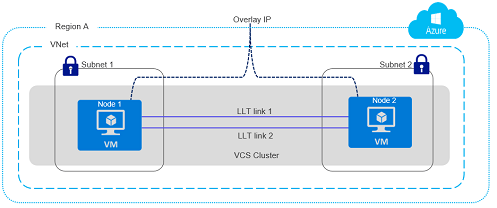
The sample configuration includes the following elements:
-
A Azure virtual network (VNet) is configured in Region A of the Azure cloud
-
An application is configured for HA using a cluster that comprises two nodes, Node1 and Node2, which are Azure virtual machines
-
Node 1 exists in Subnet 1 and Node 2 exists in Subnet 2.
-
An overlay IP is configured to allow redirecting IP address traffic to another cluster node belonging to different subnet within the same VNet as a part of the failover or the failback operations
Sample service group configuration with overlay IP for failover across subnets in the same VNet
The following snippet is a service group configuration from a sample VCS configuration file (main.cf):
Sample configuration using AzureAuth agent
group AzureAuthGrp (
                 SystemList = { AzureVM1 = 0, AzureVM2 = 1 }
                 Parallel = 1
                 )

                 AzureAuth azureAuth (
                       SubscriptionId = 640a326-fga6-90gh-b616-c1e9bb
                       ClientId = e8d899-d32a-47d04-8986-be739104d
                       SecretKey = fntPgnUnhTprQrqpiNtrItpRhnGrrNklFngLs
                       TenantId = 9fjkabae-2348-4308-b503-6667d61
                                 )

                 Phantom phres (
                                 )

 group AzureOverlayIPGrp (
                 SystemList = { AzureVM1 = 0, AzureVM2 = 1 }
                 )

                 IP IP_res (
                                 Address = "192.168.3.88"
                                 SubNetMask = "255.255.255.0"
                                 MACAddress @AzureVM1 = 00-0D-3A-91-73-A0
                                 MACAddress @AzureVM2 = 00-0D-3A-92-03-DC
                                 )

                 NIC NIC_res (
                                 MACAddress @AzureVM1 = 00-0D-3A-91-73-A0
                                 MACAddress @AzureVM2 = 00-0D-3A-92-03-DC
                                 )

                 AzureIP AzureOverlayIPres (
                          MACAddress @AzureVM1 = 00-0D-3A-91-73-A0
                          MACAddress @AzureVM2 = 00-0D-3A-92-03-DC
                          OverlayIP = "192.168.3.88"
                          RouteTableResourceIds = {
                              "/subscriptions/640a326-fga6-90gh-b616-c1e9bb/
                                                                                                                             resourceGroups/TestRG/providers/Microsoft.Network/
                                                                                                                             routeTables/testRoute_eastUS2",
                              "/subscriptions/640a326-fga6-90gh-b616-c1e9bb/
                                                                                                                         resourceGroups/TestRG2/providers/Microsoft.Network/
                                                                                                                      routeTables/route1" }
                               AzureAuthResName = azureAuth
                                 )

                 IP_res requires AzureOverlayIPres
                 AzureOverlayIPres requires NIC_res
Sample configuration using a managed identity
group AzureOverlayIPGrp (
 SystemList = { AzureVM1 = 0, AzureVM2 = 1 }
 )

     IP IP_res (
     Address = "192.168.3.88"
     SubNetMask = "255.255.255.0"
     MACAddress @AzureVM1 = 00-0D-3A-91-73-A0
     MACAddress @AzureVM2 = 00-0D-3A-92-03-DC
     )

     NIC NIC_res (
     MACAddress @AzureVM1 = 00-0D-3A-91-73-A0
     MACAddress @AzureVM2 = 00-0D-3A-92-03-DC
     )

     AzureIP AzureOverlayIPres (
     MACAddress @AzureVM1 = 00-0D-3A-91-73-A0
     MACAddress @AzureVM2 = 00-0D-3A-92-03-DC
     OverlayIP = "192.168.3.88"
     RouteTableResourceIds = {
     "/subscriptions/640a326-fga6-90gh-b616-c1e9bb/
     resourceGroups/TestRG/providers/Microsoft.Network/
     routeTables/testRoute_eastUS2",
     "/subscriptions/640a326-fga6-90gh-b616-c1e9bb/
     resourceGroups/TestRG2/providers/Microsoft.Network/
     routeTables/route1" }
     ManagedIdentityClientID = 1da89bd2-9735-4266-b920-27c23b98f022
     )

 IP_res requires AzureOverlayIPres
 AzureOverlayIPres requires NIC_res
Related information