
Replication within an Azure region - Windows
In an Azure cloud environment, in a single region, you can provision your setup across virtual networks (VNets) or within a VNet.
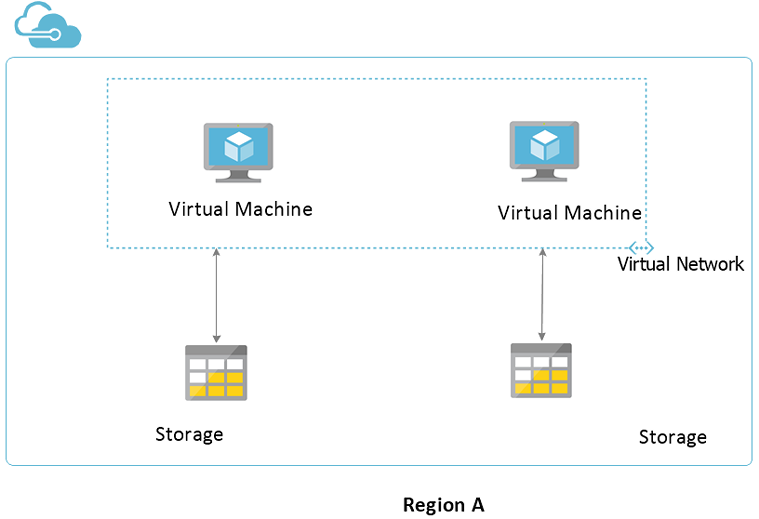
The following diagram illustrates the sample configuration for setting up replication between the same VNet:
Figure: Sample configuration for setting up replication between same VNet
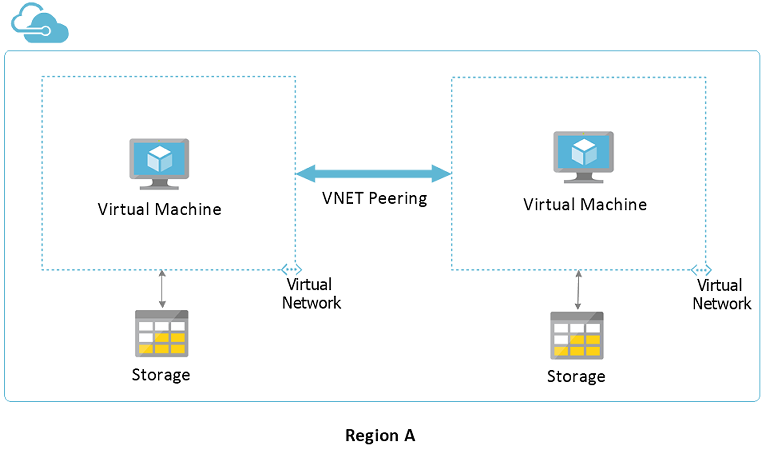
The following diagram illustrates the sample configuration for setting up replication across VNets:
Figure: Sample configuration for setting up replication across VNets
Setting up replication in the same VNet
To set up replication in the same VNet within the same region
-
Enable the ports that are used for inbound and outbound communication.
For details, refer to the InfoScale Installation and Upgrade Guide - Windows.
-
Using Microsoft Azure portal, create a VNet and specify an IP address space for the VNet.
-
Create a subnet in the VNet created.
For details about creating a VNet, specifying an IP address space, and creating a subnet, refer to Microsoft documentation.
-
Create two virtual machines within the subnets and provision storage.
-
Install the appropriate InfoScale product on both the virtual machines.
-
Create VxVM disk groups, VxVM volumes, Storage Replicator Log (SRL), Replicated Volume Group (RVG), and RLinks.
-
Flush the iptables on both the virtual machines.
# iptable -F
-
Set up replication between the virtual machines using the private IP address or the virtual IP address.
-
Verify the replication status.
# vradmin -g dg_name repstatus rvg_name
Ensure that the replication status shows:
Replication status: replicating (connected)
Setting up replication across VNet
To set up replication across the VNets, within the same region
-
Using Microsoft Azure portal, create two VNets and specify an IP address space for each VNet.
-
Set up VNet Peering between the two VNets.
-
Create a subnet in each VNet.
-
Create a virtual machine in each subnet and provision storage.
-
Install the appropriate InfoScale product on both the virtual machines.
-
Create VxVM disk groups, VxVM volumes, Storage Replicator Log (SRL), Replicated Volume Group (RVG), and RLinks.
-
Flush the iptables on both the virtual machines.
# iptable -F
-
Set up replication between the virtual machines using the private IP address or the virtual IP address.
-
Verify the replication status.
# vradmin -g dg_name repstatus rvg_name
Ensure that the replication status shows:
Replication status: replicating (connected)
Related information